
In 2023, OpenAI announced that ChatGPT reached 100 million users in two months. This news was a big surprise to the tech world. It quickly made AI a part of everyday life.
If you’re wondering, “What is generative AI?” you’re in good company. This guide explains generative artificial intelligence simply. It’s for people all over the United States.
Access is the key thing right now. Tools like ChatGPT, Google Gemini, Microsoft Copilot, and Adobe Firefly bring creative features to our devices. They’re not just for experts in labs anymore.
We’ll talk about systems that make new content. This includes text, images, audio, and code. It’s a step up from older AI that only sorted or predicted things, like spam filters.
You’ll learn how AI generation happens on a basic level. We’ll discuss the models that run it and how it’s used in real products. And we’ll go into tough issues like bias, deepfakes, and unexpected limits.
By the end, you’ll understand generative AI well enough to discuss it confidently. You’ll also know how to start using some tools. If you’re still asking, “What is generative AI?” just keep reading. We’re going to explain everything step by step.
Key Takeaways
-
AI generation quickly became a big deal, thanks to popular tools like ChatGPT.
-
Generative AI is about making new stuff, not just sorting or guessing.
-
This guide is easy to understand and applies to real-life situations in the U.S.
-
We’ll touch on the main ideas behind the models, the training, and what they create.
-
The benefits and risks, like bias and deepfakes, will be covered too.
-
You’ll get to know what steps to take next to explore these tools further.
What is Generative AI?
What is generative AI? It’s artificial intelligence that creates content. It doesn’t just sort or score existing things. It can write text, make images, compose music, create video clips, or suggest code from learned data patterns.
Unlike tools that predict labels like “spam” or “not spam”, this tech makes new, believable content. It uses generative models to understand structure, style, and context. Then, it creates something new based on what it has learned.
Definition of Generative AI
Generative AI uses algorithms to turn training data into new creations. This shouldn’t be confused with simply copying. It generates responses that mirror the training patterns but are tailored to specific requests.
This technology is behind familiar products. For instance, ChatGPT can draft text in various styles. DALL·E and Midjourney generate images from brief prompts. Adobe Firefly assists in design tasks, like making backgrounds or text effects in workflows.
Key Characteristics of Generative AI
These tools work based on your prompts. The way you instruct them affects the outcome. By adding examples and setting constraints, you refine the results over several rounds. It’s through this process that the best creations emerge.
Outputs from these tools can vary. Even with identical prompts, the results might not be the same. By using control features like temperature settings or a fixed seed, teams can achieve more consistent outcomes.
- Novel creation: Generative models can make new text, images, or code. These creations follow a pattern but are not exact copies.
- Interactive prompts: Your commands, tone suggestions, and specific guidelines direct the outcome and streamline revisions.
- Variable results: The algorithms might offer different choices. This variety is useful for brainstorming but needs a review process.
- Safety and quality: The final product’s quality and safety are determined by data quality, filters, and human oversight.
| Approach | Main goal | Typical output | Everyday example |
|---|---|---|---|
| Generative AI | Create new content from learned patterns | Drafts, images, melodies, code snippets | ChatGPT writing a product description; DALL·E generating an image |
| Discriminative AI | Classify, score, or predict a label | Categories, rankings, probabilities | Email spam detection; fraud classification in payments |
The History of Generative AI
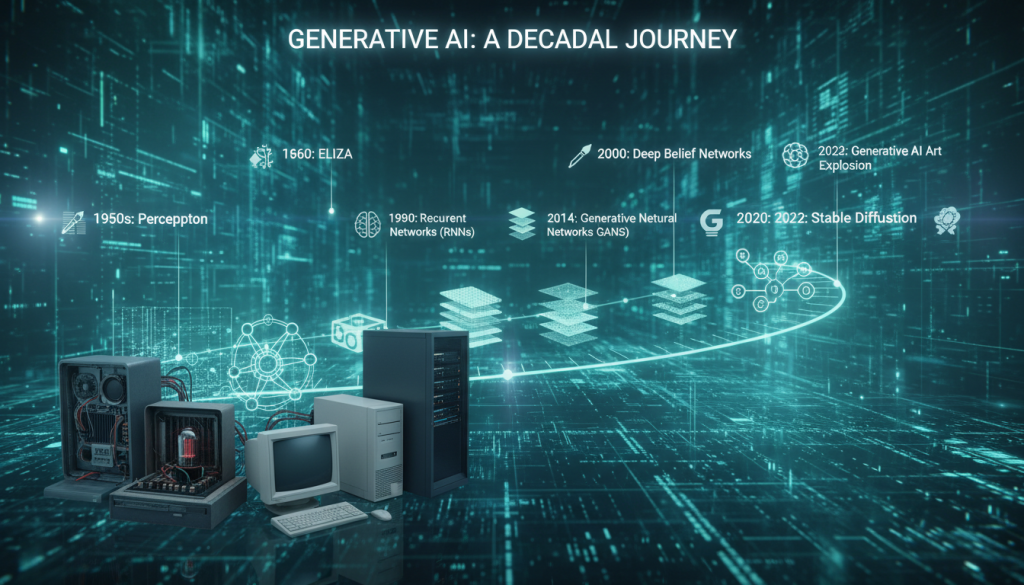
Generative AI didn’t just pop up. It’s the result of many years of study in machine learning. Experts wanted to figure out how to create fresh text, pictures, or music that seem genuine. This idea was easy to talk about but tough to make happen.
Early Developments
First attempts combined chances with spotting patterns. Scientists made language models that predicted the next word using frequency and context. These early systems were a bit awkward but showed creation was achievable.
Neural networks came into play, even with slow computers and less data. They laid the groundwork for the deep learning breakthroughs we see today. Each advancement made models better at learning from data.
Evolution Over the Years
Data collection got easier with the web, and GPUs sped up the learning process. Bigger models and longer training became feasible. This changed the capabilities of machine learning significantly.
Models started teaching themselves using unsupervised and self-supervised techniques. They learned from untagged texts and pictures by guessing missing info. This led to a deeper understanding in models, capturing complex meaning and style.
| Era | Typical approach | What improved | Real-world impact in the U.S. |
|---|---|---|---|
| 1990s–2000s | Probabilistic models and early neural nets | Basic sequence prediction and simple text generation | Research prototypes in universities and labs |
| 2010s | GPU-trained deep learning with large datasets | Better features, stronger training stability, faster iteration | Wider use in products like speech and photo tools |
| 2020s | Transformers, diffusion, and scaled training in cloud stacks | High-quality language and image generation with more control | Mainstream apps and enterprise rollouts across industries |
Modern Breakthroughs
Transformers led the way in today’s AI language abilities. They made machines better at long, meaningful conversations. ChatGPT-style tools showed AI’s jump from tests to everyday use.
Image-making tech leaped forward too. GANs and diffusion models improved photo-like quality, adding detail control. These steps relied on extensive deep learning and smart data handling.
Cloud computing quickly turned theory into real products. Companies like Microsoft and Google made these models easy to use. Adobe added AI features in tools many U.S. professionals already work with. Getting AI out of the lab and into business became easier as tools evolved.
How Generative AI Works
Generative AI functions through clear steps, not magic. It picks up data patterns, then creates text, images, or sounds as requested.
This system scores your prompts as signals, tweaking them to match. The aim is to produce work resembling what it learned.
The Role of Machine Learning
Machine learning is at the heart, learning from vast data to find patterns. It fine-tunes settings, known as parameters, to make fewer errors.
Errors are gauged by a loss function. An optimizer adjusts parameters to lessen these errors until the model improves.
This improvement, or generalization, lets it manage new prompts. Without it, models may stray despite seeming sure.
Neural Networks Explained
Neural networks, used in most systems, consist of layered math operations. These layers depict useful features for processing images or text.
Deep learning takes this further with additional layers, capturing complex ideas. But, more layers can complicate management and up costs.
Scale greatly influences ability. Adding data, computing power, and new designs helps, yet complexities grow, such as memorizing unnecessary details or accidental bias.
Data Input and Output
Inputs can be text, images, or styles; the model responds accordingly. For text, it breaks it down through tokenization.
It generates content piece by piece, making choices based on what’s likely. Temperature and top-p settings adjust creativity and steadiness.
Error checks are vital because the model predicts patterns, not facts. Verification ensures reliability.
| Part of the workflow | What happens | Why it affects results |
|---|---|---|
| Training with machine learning | Parameters are updated to minimize a loss function through optimization. | Better training improves generalization and reduces repeated errors. |
| Representation building in neural networks | Layers transform inputs into features, from simple signals to higher concepts. | Deeper stacks can capture nuance, but may raise compute costs and risk. |
| Generation and sampling | Token-by-token or pixel-by-pixel output is selected using temperature and top-p. | Controls the tradeoff between creativity and consistency. |
| Post-checks | Humans or tools validate claims, math, and context against trusted references. | Helps catch hallucinations and keeps generated content usable. |
Types of Generative AI Models
Not all generative models are the same. Some are good at creating sharp images. Others excel in maintaining stable control or generating coherent text. The right model for you depends on your data, what you want to achieve, and your tolerance for risk during training.
These generative algorithms craft new outputs from existing patterns. AI generation transforms these patterns into something we can read, see, or interact with.

Generative Adversarial Networks (GANs)
GANs are like a contest between two neural networks. The generator creates fake samples. The discriminator tries to tell real from fake. This competition helps both parts get better over time.
GANs are known for producing detailed images. They are important in image research. However, balancing this setup can be tough, which sometimes leads to unstable training. Another issue, called mode collapse, happens when the system repeats certain outputs too much.
Variational Autoencoders (VAEs)
VAEs work by compressing input into a latent space and then decoding it back into an output. This makes them good at identifying patterns in data.
The continuous nature of the latent space allows for smooth changes between two points. This is useful for tweaking style or details a bit at a time. VAE images might not be as sharp as GAN images, but they are usually more stable.
Transformer Models
Transformers use attention to focus on important parts of the input. This is why they do well with language tasks, where context can be spread out across a sentence.
Many well-known tools, like ChatGPT and Copilot, are built on transformers. This technology also helps in combining text and images. Diffusion methods, used with these models, are making high-quality AI creation more common.
| Model family | What it’s best at | Typical trade-offs | Common product fit |
|---|---|---|---|
| GANs | Sharp, high-frequency detail in images | Training can be unstable; risk of mode collapse | Image synthesis, editing, super-resolution |
| VAEs | Smooth latent controls and interpolation | Outputs may look softer; detail can be harder to preserve | Structured generation, representation learning |
| Transformers | Long-range context for text and code | Compute-heavy; output can reflect training data biases | Chat, search assistance, coding help, multimodal tools |
Applications of Generative AI
Generative AI is changing how we work every day. Teams are using it to come up with, design, and try out ideas quicker. But, its real benefit is seen when it’s paired with thorough reviews and clear goals. Combining it with natural language understanding and deep knowledge in a field makes it even more powerful and safer to use.
In many sectors, AI is great for initial attempts. It’s changing how we do research, cutting down the time we stare at a blank page, and helping us weigh different options. Seeing AI’s work as a beginning point, not the end, is the smart way.
Content Creation
Marketing teams are using AI to create catchy headlines, draft webpages, write product descriptions, and come up with social media posts. It’s also handy in summing up info, responding to emails, and making texts clearer. Programmers rely on it for coding suggestions, creating tests, and giving quick explanations.
Still, we can’t do without humans checking the work. Someone needs to make sure the facts are right, adjust the tone, and ensure the brand’s voice remains consistent. AI might sound sure of itself even when it’s wrong, so reviewing its output is crucial.
Image Generation
For design work, AI can come up with concept art, different ad designs, and early prototypes. Tools like Midjourney, DALL·E, and Adobe Firefly follow a simple process: prompt, iterate, and then perfect. This helps teams try out looks before fully committing to one.
Effective prompts should talk about the subject, style, light, and limits. Many designers keep a log of prompts so they can get consistent results. AI works best when it’s backing up the creative direction, not taking over it.
Music Composition
In music, AI tools can whip up melodies, backing tracks, and sound designs quickly. Then, it’s up to the humans to refine the structure, change instruments, and mix everything into a final piece. Here too, AI is a big help in the early drafting phase.
But, the legality and uniqueness of music still count. Artists and labels need to check rights, dataset permissions, and agreements before going public. AI can open doors to new musical ideas, yet what ultimately resonates is guided by human judgment.
Drug Discovery
In the biotech field, AI models suggest new molecular structures and navigate chemical databases faster than traditional searches. Scientists use these suggestions to decide which compounds to test first. Natural language tools also speed up the process of reviewing scientific literature.
Even then, laboratory testing is indispensable. Every compound has to be proven safe, effective, and manufacturable through lab tests and comply with regulations. AI can cut down the time for initial research, but it’s no substitute for actual experiments.
| Use case | Where it helps most | Common tools or outputs | Key human checkpoint |
|---|---|---|---|
| Content creation | First drafts, rewrites, summaries, email and caption variants | Ad copy options, blog outlines, support replies, code hints | Fact checks, tone control, brand voice, compliance review |
| Image generation | Concepting, rapid style exploration, mockups and ad versions | Midjourney, DALL·E, Adobe Firefly; prompt → iterate → refine | Art direction, final retouching, rights and usage checks |
| Music composition | Melody sketches, backing tracks, sound design experiments | Loops, stems, demo tracks, arrangement ideas | Licensing review, originality screening, production and mixing |
| Drug discovery | New molecule proposals and faster early-stage candidate search | Generated structures, ranked candidates, literature extraction via natural language processing | Wet-lab validation, toxicity testing, regulatory documentation |
Benefits of Generative AI
In the U.S., generative AI is a strong support tool, but not a stand-in. It transforms basic ideas into practical starting points. From there, humans refine the outcomes. These models use algorithms to create new text, images, and more from data patterns.

Enhancing Creativity
Stuck on a blank page? Natural language processing offers quick ideas. It helps come up with headline angles, campaign themes, or new ways to describe a product’s benefits. It’s great for quick tests of different voices, structures, and speeds before making a final choice.
Design and brand teams also benefit from generative algorithms. They experiment with color feels, layout ideas, or style hints, keeping what matches their brand. The result is a broad range of options quickly, without losing the human touch.
Improving Efficiency
Generative models speed up drafting. They handle repeating tasks like summaries, outlines, meeting notes, and updates. In design, they enable fast comparisons of options without the wait.
For product and engineering, they aid in coding. They suggest standard codes, clarify errors, and offer fixes, with a developer reviewing the suggestions. This review is key for security and precision.
Customization and Personalization
Generative algorithms fine-tune messages for various U.S. audiences. This tailoring considers tone, reading levels, and local expressions. Natural language processing ensures clear, consistent communication across platforms.
To maintain control, teams set guidelines. They use brand rules, prompt patterns, and basic oversight to keep generative AI within bounds. These measures also simplify repeating processes across teams.
| Benefit area | Common team use | Where the human stays involved | Operational guardrail |
|---|---|---|---|
| Creativity | Brainstorm angles, style variants, and rapid prototypes using generative models | Selects best options, refines voice, and checks brand fit | Approved examples and a short prompt library |
| Efficiency | Drafts, rewrites, summaries, and faster iterations powered by natural language processing | Edits for accuracy, removes weak claims, and finalizes structure | Review checklist and version control |
| Personalization | Segmented messaging by audience, channel, and reading level with generative algorithms | Validates tone, compliance, and sensitivity to local context | Brand rules, compliance notes, and reusable templates |
Challenges and Limitations
Generative artificial intelligence looks simple at first, but complications arise quickly. These systems learn from vast patterns, including mistakes and private or harmful content. If they create content, it can spread wide before anyone reviews it.
Ethical Concerns
The questions of copyright and ownership are complex. If AI learns from copyrighted work, it’s unclear who owns the result or who should earn from it. Getting permission is crucial, especially when using public data, voice clips, or pictures not meant for AI training.
As AI scales up, privacy threats increase. It might share personal info or help piece it together from bits. The same tools crafting helpful emails could also fuel scams or fake endorsements that seem legit at first.
Bias in AI Outputs
Bias can stem from unbalanced data. This may lead AI to repeat stereotypes or ignore certain groups. Politeness doesn’t mask biases in representation or fairness.
To fight bias, teams use diverse tests, varied data sets, and human checks. It’s critical to review AI outputs by different standards, not just overall correctness. Managing AI responsibly is as crucial as the technology itself.
Technical Limitations
“Hallucinations” pose a big challenge, with AI making up information confidently. Even slight changes in input can drastically alter outputs, which confuses users.
The costs of running AI are not trivial. There’s the price of computing, delays, and more energy consumption. Some AI cannot keep up with new data or handle long info without updates.
| Limitation | What it looks like in real use | Common mitigation in practice |
|---|---|---|
| Hallucinations | Confident but incorrect claims, made-up citations, or wrong summaries | Guardrails, retrieval-augmented generation (RAG), citations and verification checks |
| Prompt sensitivity | Different outputs from small input changes, inconsistent formatting or tone | Prompt templates, test suites, and human review for high-stakes tasks |
| Compute and latency | Slow responses, higher costs during peak traffic, limited device support | Model routing, caching, smaller models for routine work, internal policies on use |
| Context and freshness limits | Missed details in long documents, stale facts in fast-changing topics | RAG, document chunking, and clear rules for when to verify externally |
Generative AI vs. Traditional AI
What is generative AI? It’s a tech that helps you create, unlike traditional AI, which helps you decide. They both use machine learning but aim for different goals.
Traditional tools sort, score, and predict things. Generative models, however, create new text, images, audio, or code similar to their training data.
Key Differences
Traditional AI trains on labeled examples, like “fraud” vs. “not fraud.” It’s easier to test and use, especially in steady business tasks.
Generative AI learns from huge, less labeled data sets. It can then draft emails, summarize reports, or provide various options from a single prompt.
| Category | Traditional AI | Generative AI |
|---|---|---|
| Main goal | Predict or classify outcomes | Create new content and variations |
| Typical outputs | Risk score, label, forecast, recommendation | Draft text, image concepts, code snippets, synthetic data |
| Training data | Often relies on labeled datasets and clear targets | Often uses large-scale self-supervised learning to learn patterns |
| How you evaluate | Accuracy, precision/recall, error rates, stability over time | Helpfulness, relevance, safety, factuality checks, human review |
| Best fit | Fraud detection, demand forecasting, routing, quality inspection | Ideation, prototyping, customer support drafts, content versions |
Pros and Cons Comparison
Generative AI is flexible because it uses plain language. It can take on many tasks with machine learning.
But there are downsides to this flexibility. It can lead to mistakes that sound sure. This means more checking and rules are needed. Quality of training data matters a lot, and it’s easier to misuse.
For important decisions, like loans or medical triage, classic AI or rules-based systems are better. But for creative tasks like drafting or brainstorming, generative AI is great.
The Future of Generative AI
Generative AI is quickly advancing, with a focus on practical applications. Teams are looking for AI that can handle secure data, produce clear outcomes, and has predictable expenses. While deep learning remains critical, significant improvements are expected in how we work with these models.
Now, natural language processing is evolving from simple conversations to actionable tasks. AI systems will assist in planning steps, selecting tools, and monitoring progress. Integrating quality control and policy checks into daily operations becomes essential, not just an additional step.
Trends to Watch
Multimodal systems are setting new standards. A single model can process various inputs like text, images, voice notes, or videos and produce a cohesive response. This versatility improves how we manage customer support, design feedback, and educational materials.
Tasks are getting more automated in a smarter way. Specialized workflows divide a job into smaller pieces, then tackle them by using specific tools. Deep learning suggests next steps, while natural language processing ensures the process stays straightforward.
How we deploy these systems is also changing. There’s a growing demand for running AI on personal devices or in private clouds, especially for handling sensitive information. This requires stricter security measures, better logging practices, and more isolated models.
Potential Advancements
Now, there’s a bigger focus on getting things right than just being creative. Many teams combine AI with tools that verify information to minimize mistakes. This blend maintains the speed and utility of AI while improving reliability.
AI is also becoming more controllable. Brands are looking for ways to maintain a consistent voice and make sure their messaging is appropriate. Expect to see more tools that restrict AI outputs to stay on brand, using natural language processing to apply these rules effectively.
We will likely see more ways to track the origin of AI-generated content, including watermarks. At the same time, there’s a push for more efficient models. These smaller, cost-effective models can still compete on performance.
Industry Impact
The focus is shifting towards fine-tuning and strategizing. People will concentrate more on creating detailed prompts, verifying sources, and enhancing content quality. AI-generated drafts are just the beginning, requiring human insight to perfect them.
Regulated sectors will need to adapt to new standards. Fields like finance, healthcare, and education must maintain accurate records, implement risk management, and develop content policies suited to AI capabilities. Natural language processing will be crucial for standardizing important documents and tracking changes.
| Focus area | What’s changing | What strong teams do next |
|---|---|---|
| Multimodal work | Text, images, audio, and video flow into one workflow | Set review checkpoints and store approved assets for reuse |
| Agentic automation | Systems plan steps and call tools to complete tasks | Limit tool permissions and log actions for accountability |
| Factuality | Answers rely more on retrieval and verified data | Require citations, test prompts, and track error patterns |
| Brand and policy control | More demand for consistent tone and safe claims | Use style rules, blocked topics, and human sign-off lanes |
| Privacy and deployment | More on-device and private-cloud use for sensitive work | Map data access, encrypt logs, and segment model inputs |
Understanding Deepfakes
Deepfakes are easier to make and harder to detect every day. They combine deep learning, affordable computing, and common sharing habits. This blend makes us question our trust in videos and sounds.

What Are Deepfakes?
A deepfake is fake media, like videos or sounds, that seems real. It uses AI to learn from many faces and voices. Systems create new scenes with these learned features.
The essentials are easy to list but hard to manage: lots of data, powerful models, and easy-to-use tools. With quick improvements in deep learning, even brief clips can create realistic fakes.
Use Cases and Controversies
Deepfakes can be good if there’s consent and honesty. They help in movie making, dubbing, and improving tech for those with disabilities.
But they can also cause harm. They spread false information, create unwanted content, and trick people. Fakes in politics and finance spread quickly, often outpacing the truth on social sites.
| Scenario | Potential Benefit | Primary Risk | Practical Safeguard |
|---|---|---|---|
| Film editing and reshoots | Fixes continuity issues without extra filming | Rights disputes over a performer’s likeness | Written consent, union-aligned contracts, on-set logs |
| Dubbing and localization | Natural lip-sync and clearer translations | Deceptive edits that change meaning | Disclosure in credits, locked scripts, review workflows |
| Satire and parody | Commentary that lands quickly with audiences | Viewers may miss the joke and believe it | Labels on-screen, platform reporting tools, watermarking |
| Fraud and impersonation | None in legitimate settings | Wire-transfer scams and identity theft | Call-back verification, dual approval, voice PINs |
Defenses are getting better, yet they’re not perfect. Tools that detect fakes look for oddities and timing issues. And strategies like watermarking help show the source of media. Many groups train their people to check carefully, because while AI can copy a voice, it can’t fool a good verification check.
Generative AI in Art and Design
Generative AI is becoming a daily tool in design, from quick sketches to final campaigns. It uses advanced algorithms, letting teams try out ideas quickly without losing their creative view.
AI starts with a rough idea, maybe a mood board or style choices for posts. Adobe Firefly is great for designs that fit smoothly into professional tools. Midjourney is better for unique, eye-catching styles that encourage new ideas.
Digital Art Applications
Create good prompts by being brief, clear, and visual. Describe the subject, place, light, and atmosphere. Add limits like “minimal text” to make the output work better. Artists often use reference pictures to ensure the artwork matches the intended look or brand feel.
For improving your draft, inpainting corrects small issues like correcting hands or removing shadows. Outpainting helps expand your art for banners or new backgrounds. Upscaling enhances textures and details. Then, move to Adobe Photoshop or Illustrator for the final touches.
| Task | What to do | Why it helps | Typical handoff |
|---|---|---|---|
| Mood boards and concepting | Run several prompts with tight style notes and a few variations | Builds options fast while keeping direction consistent across a campaign | Select 6–12 frames, then refine palettes and typography in Photoshop |
| Style exploration | Test different art directions using generative models with the same subject | Shows range without restarting from scratch each time | Pick a “hero” style and document it in a mini style guide |
| Background generation | Create clean backdrops, patterns, or scenes; use outpainting to fit sizes | Makes ad resizing and platform swaps quicker and cheaper | Export layers and adjust edges, grain, and color match in Photoshop |
| Fixes and finishing | Use inpainting for problem areas; upscale before final export | Reduces obvious artifacts and improves clarity for paid media | Finalize in Illustrator for vectors or in Photoshop for raster deliverables |
Collaboration with Human Artists
The best outcomes come when AI helps the artist, not replaces them. Creative heads still guide the project, ensuring it matches the brand. While AI provides many options, humans add the critical eye and creativity.
In the U.S., who gets credit and the legal rights to the art are crucial. Teams keep track of the tools used, save the creative inputs, and check rights before delivering to clients. Being clear about AI use is key, especially in ads and public campaigns, where standards are high.
When used right, AI generation is just another step in production, like retouching or laying out a page. The best method is simple: create a lot, select the best, then refine with care.
The Role of Generative AI in Business
Generative AI is becoming essential in daily business operations. With clear rules and good data, it reduces routine work without affecting critical thinking or decisions.

Automation in Industries
The first benefits in offices are straightforward: drafting documents, summarizing meetings, and generating reports quickly. These AI tools, powered by machine learning, help with coding, sorting issues, and automating tasks across several departments.
To safely adopt AI, businesses need strong protections. They must manage data well and review their vendors to prevent data breaches and pass audits comfortably. It’s also crucial to integrate AI tools with popular platforms like Microsoft 365 and Google Workspace to avoid system-switching hassles.
| Business area | High-value use case | Best-fit controls | Where it plugs in |
|---|---|---|---|
| Marketing | Campaign briefs, A/B ad variants, performance recap drafts | Brand voice review, approved prompt library, source checks | Google Workspace, Microsoft 365 |
| HR | Job descriptions, interview kits, onboarding guides | Role-based access, retention limits, bias monitoring | Microsoft 365 |
| Legal ops | Clause suggestions, policy rewrites, contract summaries | Confidential data rules, redaction, audit logs | Microsoft 365 |
| IT | Incident write-ups, runbooks, code assistant help | Sandbox testing, least-privilege access, change tracking | Microsoft 365 |
| Sales | Account notes, call summaries, follow-up emails | CRM field permissions, data retention, human approval for outbound | Salesforce |
Enhancing Customer Experience
AI makes customer tools seem more human through skilled natural language processing. Chatbots can solve simple problems and pass complex ones to humans with the full details. AI also tailors product suggestions based on what’s in stock and what customers like.
Keeping quality high is as crucial as being fast. Teams ensure the AI’s responses are correct, avoid risky sources, and check for inappropriate content. They judge the AI’s value by the time it saves, the speed of services, and how well it handles tasks alone, balanced against the costs of training and risk control.
Learning Resources for Generative AI
Wondering, What is generative AI?? The best approach is to dive in and start doing. Mixing various resources helps link deep learning and neural networks to practical results like words, images, and code.
Online Courses and Platforms
If you prefer organized learning, platforms like Coursera, edX, Udacity, fast.ai, and DeepLearning.AI have project-based lessons. These start with the basics of neural networks and guide you through deep learning techniques and model improvement steps.
Looking to enhance your product skills? Learning centers from Google, Microsoft, and OpenAI offer great insights into tools and deployment. By practicing in Kaggle notebooks or Google Colab, you can try out your ideas fast without a complex setup.
For real-life applications, GitHub’s tutorials demonstrate end-to-end examples from data setup to output testing. Model libraries such as Hugging Face allow for easy comparison and trial of different AI models in a secure setting.
| Resource Type | Best For | Typical Focus | Hands-On Option |
|---|---|---|---|
| Coursera / edX | Step-by-step learning | Foundations of deep learning and applied projects | Guided assignments and quizzes |
| Udacity | Career-style projects | Model building, testing, and deployment habits | Project reviews and workflows |
| fast.ai | Practical speed | Training neural networks with strong defaults | Notebook-based experimentation |
| Kaggle / Google Colab | Practice and iteration | Reproducible experiments and sharing results | Hosted notebooks with GPUs |
| Hugging Face | Model exploration | Trying generative models and comparing outputs | Model hubs and sample code |
Books and Podcasts
Books offer a slower, deeper way to learn. Deep Learning by Ian Goodfellow and others teaches the reasons behind neural network success. Meanwhile, Natural Language Processing with Transformers connects these theories to current tech practices.
Designing Machine Learning Systems by Chip Huyen is perfect for evolving from tests to functional systems. It highlights how deep learning affects costs, speed, and data accuracy.
Podcasts and newsletters offer the latest insights but can be overwhelming. Always double-check facts by looking into documentation, reviewing code, and comparing model outputs for the most accurate information.
How to Get Started with Generative AI
Starting with AI generation is actually easy. Just start with a simple target. This could be drafting an email, wrapping up a report, or coming up with a new campaign idea. Getting these easy tasks done helps you understand how generative models react to details like context, tone, and limits.
You’ll also discover where natural language processing excels and when it needs a human to double-check.
Tools and Technologies
If you’re into writing or chatting, check out ChatGPT, Claude, Google Gemini, or Microsoft Copilot. For creating images, tools like Adobe Firefly, DALL·E, and Midjourney turn short descriptions into graphics. Want to set up workflows? Explore OpenAI API, Google AI Studio, Azure AI Foundry, and Hugging Face Transformers. Learn about prompts, tokens, embeddings, and basic evaluation early on. This helps you compare outcomes and get better results.
Recommendations for Beginners
Start with a basic cycle: set your aim, include necessary context, specify the format you want, and refine through iterations. Then, double-check your facts and finalize. This is crucial for content related to policy, health, legal matters, or finances. Always have a quality checklist: confirm facts, look out for bias, steer clear of personal or sensitive data, and ask for sources if possible. This keeps AI useful and in line.
Keep track of what succeeds and what doesn’t. Save your top prompts, outcomes, and adjustments. Then, create a guide your team can follow. Over time, you will develop consistent techniques. This will make working with generative AI seem less new and more like a dependable workplace tool.


